Practical systems for better work
Custom software development services for your business
A small business does not always need a bigger suite. It needs the pieces it already relies on to talk to each other, with one clear place to see status, responsibilities and next actions. AllonOak provides custom business software development for growing teams that want practical internal systems rather than a rip-and-replace project: API integrations, databases, dashboards, approval flows and AI assistants built around existing tools.
Your tools. One system built around your work.
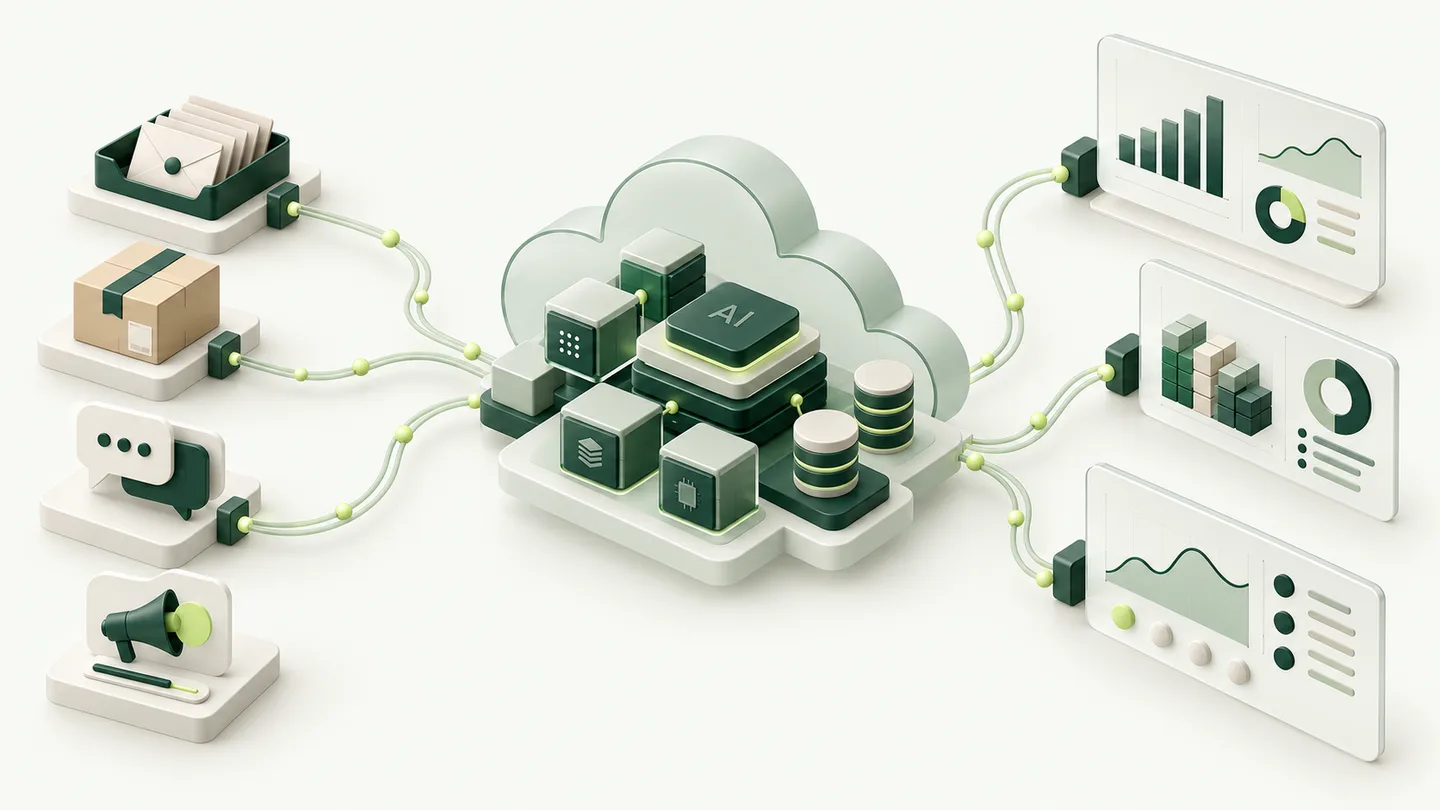
Start with one process, then connect more sources as your needs grow. This example shows how business data could become useful reports, review queues and internal tools.
Start with one process
Email
Bring enquiries and attachments into a structured queue.
Online store
Connect orders and product records to follow sales and fulfilment.
Customer support
Collect support topics and return reasons for review.
Advertising
Compare campaign spend with sales for the same period.
Check, connect and organise
Validate and match records, use AI to classify text where useful, and flag gaps for review. Custom connectors and workflow tools fit around your existing systems.
Margin and costs
View sales alongside available costs, with clear calculations and gaps.
Returns
Follow return patterns and records that need investigation.
Inventory
See stock changes and items that need someone’s attention.
Customer feedback
Group recurring feedback and keep links to the original context.
Illustrative design: we agree the connections, calculations and who may access each data source.
Custom software shaped around your business needs
The best internal tool usually starts with a plain question: where does information enter, where does it get stuck, and who needs to decide next? We look at spreadsheets, inboxes, shared drives, CRM records, finance exports, warehouse notes and the informal knowledge that lives in chat. The proposed system can then connect those sources, keep the data model understandable, and present the few screens or reports people actually need.
This is bespoke software development in the practical sense: not custom for its own sake, but shaped around your business needs, roles and operating rhythm. A service business may need enquiry intake, quote follow-up and job status. A product business may need stock visibility, order exceptions and margin views. The right scope comes from the workflow, not from a feature list copied from another company.
- Connect existing tools before replacing them
- Agree who manages the data and what each field means
- Keep admin screens simple enough for daily use
Custom software development for small businesses or off-the-shelf software?
When considering custom software for small businesses, start with the tasks your existing tools already handle well. Off-the-shelf software can be the right choice for standard accounting, scheduling or a straightforward CRM. Custom software becomes useful when important business processes cross several tools, the same data is entered repeatedly, or an existing system cannot support the way people actually work.
We compare the cost of keeping the current workflow, configuring an existing product and building custom software. The decision should follow business objectives: fewer manual handoffs, clearer information, or an internal service that cannot be configured reliably with standard tools. A tailored software solution can connect to the applications you want to keep. It need not replace your entire setup.
If you are comparing a software development company with a ready-made platform, ask what happens to your data, integrations and ongoing costs when requirements change. The most useful development partner explains those tradeoffs before proposing a larger build.
Consider a consultancy that uses a CRM for proposals and a separate tool for project delivery. If an accepted proposal can already create the right project through a supported integration, configuration may be enough. If each project needs different approval steps, document requirements and access permissions, a small custom application could collect those decisions before the project is opened. The first test is whether the delivery team receives the information it needs without chasing the salesperson.
Integrate existing systems with a custom software solution
API integrations are most valuable when they reduce repeated entry and make status visible. We can help connect CRM, ecommerce, accounting, email, project management, files and internal databases, subject to the APIs and permissions available. Where an integration is fragile, we design retries, clear error states and manual fallback so one failure does not hide the whole process.
A dashboard should help your team see where action is needed. A good first version shows the few measures that trigger action: overdue enquiries, orders awaiting confirmation, low stock exceptions, unpaid invoices, sync failures or tasks stuck in review. For each alert, someone should know they are responsible and what to do next, otherwise it becomes another report nobody uses.
- Use queues or scheduled runs where real-time is unnecessary
- Log sync errors with enough context to act
- Define which system is the source of truth for each field
AI assistants inside your custom software
An internal AI assistant can help people find policies, summarise meetings, prepare briefs, compare options or draft responses from approved material. The difference between a helpful assistant and a risky one is boundaries. We scope which sources it may use, which answers require citation or review, which actions are read-only, and which requests must be escalated to a person.
Where appropriate, retrieval can run against your chosen internal documents, tickets or knowledge base, with access controls respected. Human review is kept for consequential outputs: customer commitments, contractual wording, financial actions, HR matters and anything sensitive. The assistant is proposed as a support layer that speeds up internal work while leaving accountability clear.
- Restrict retrieval to approved sources and roles
- Show provenance where it helps reviewers decide
- Keep write access separate from read access
Hosting, Docker, private VPS and when Kubernetes makes sense
For many teams, a private VPS or managed application environment is enough: straightforward backups, monitoring and control over where data is stored. Docker can package the application and its dependencies consistently, making updates, rollbacks and environment parity easier to manage without adding unnecessary infrastructure.
Kubernetes and heavier orchestration are considered only when scale, deployment complexity or service requirements justify them. They are not required by default, and we will say so if a simpler setup will serve you better. External AI or API services may still process submitted data when you use them, so private hosting alone should not be read as a promise that every data flow stays private. We map what leaves your infrastructure, what stays under your control, and which choices need review.
Before development, we agree which rights your business will receive, what code and documentation will be handed over, and how you can export your data. The handover should give the person maintaining the system enough information to operate it under the agreed terms.
- Prefer the simplest infrastructure that meets the need
- Back up data and test restore before relying on it
- Document roles, access, model usage and recovery steps
Security, privacy and data control as design goals
Privacy starts with decisions about access control, auditability, retention, backup testing and supplier review. If you operate across the UK and Europe, we can discuss data residency questions, processor terms and the limits of what your internal system can control. Compliance requirements need their own assessment; private hosting alone does not establish compliance.
The aim is to make informed choices: which data belongs in the system, which fields should be masked or excluded, which exports are allowed, who can approve changes, and how you would recover if something went wrong. Your team should be able to see how these controls work and test that they do.
- Start with least-privilege roles and clear admin ownership
- Review third-party APIs and AI services before connecting them
- Test backups, restores and incident steps before go-live
Choosing a software development company: costs and responsibilities
What does custom software development involve? We examine a real task with the people who do it, agree the business requirements and define a first usable version (MVP). Reviews use actual examples, including missing information and failed connections. The contract sets out rights to the code, documentation and the agreed handover.
Do we need to replace our current software? Often the first step is connecting the tools you already use.
Can the system run on a private server? Self-hosting can be scoped around your data, access and maintenance requirements, including Docker-based deployment on a VPS where appropriate.
How do we compare development costs? Give each development partner the same example task and acceptance criteria. Check whether their estimate includes data migration, testing with users, deployment and training. Ask separately about hosting, support and the cost of changing an integration after another provider updates its service.
Who maintains it? Ownership, documentation, support and change control should be agreed before implementation.
The custom software development process, from first test to handover
Our development process starts with your specific needs, users and data sources. We map the business processes, identify access requirements and agree what a first version must do. A short prototype can test the uncertain integration or interface before full application development begins. This gives the team a clearer basis for discussing scope, pricing and a realistic timeline.
During custom software development, we review the working screens and workflow with the people who will use them. Tests cover the normal path and exceptions such as missing data, duplicate requests or an unavailable external service. We also plan scalability around expected use, rather than adding infrastructure simply because it is available.
Before handover, the developer documents the data model, deployment, backup and recovery steps. Project management should keep decisions and responsibilities visible throughout. Custom software is a long-term business asset; clear ownership and a manageable maintenance plan matter as much as the first release.
- Define which business needs the custom software must solve.
- Build and review a focused first version with real examples.
- Integrate, test and automate the agreed workflow.
- Document the custom software solution and plan ongoing maintenance.
Custom dashboards for sales, stock and costs
Bring the figures your team needs into a dashboard built around its decisions. Depending on the available data, that could mean sales by channel, stock awaiting replenishment, costs by order or enquiries needing a reply. We agree how each measure is calculated, how often it updates and who can see it, with charts and tables that help people investigate a change.
Data processing you can check
Collect authorised data from APIs, files and databases, then check required fields, formats and duplicate records before using it. Reconcile orders, payments or stock movements against the relevant source records. Missing or conflicting values should go to a person for review, with enough context to correct them rather than disappearing into a report.
Internal tools that fit the way your team works
Your team may need a shared database, an approval screen or a focused application rather than another spreadsheet. NocoDB, Airtable or a custom interface can be considered for those jobs. We compare access controls, integrations, hosting and ongoing costs before choosing.
Airtable is a cloud service; a NocoDB deployment and its available features depend on the chosen edition and setup. n8n can connect steps where useful, while custom code handles requirements that need it.
What should your internal system make easier?
Describe who will use the system, what they need to do, and which software it should connect to. We can help define a focused first version and the hosting, access and maintenance it needs.